

Libre Planet!

So, we’re going to the Libre Planet meeting this weekend in Boston  (we being Bassam, Fateh, Pablo and Jarred.) Mainly we’ll be attending talks, working on Tube at the hackfest, helping out with the event, meeting people, catching up with friends at the event and in town, etc. We’ll see at least one regular of […]

So, we’re going to the Libre Planet meeting this weekend in Boston  (we being Bassam, Fateh, Pablo and Jarred.) Mainly we’ll be attending talks, working on Tube at the hackfest, helping out with the event, meeting people, catching up with friends at the event and in town, etc. We’ll see at least one regular of our irc channel in person for the first time (hey chris!) If you’re reading this, and going to the event, come say hi 🙂

What we’ll likely be working on: Rigging and scripting rigs in Blender 2.5, Concepts in Gimp, Animatic in Gimp and Blender.

Oh and this is Pablo and Jarred’s first visit to Boston/Cambridge. Any tips? Things we shouldn’t miss?


Cycling to the studio

Today was the first day of the season that we cycled into the studio. It’s magnificent taking the bike path during Spring and Summer, as the area is covered in forests and farmlands, and is a very inspiring way to start the day. Well energized, we’re back at boarding for myself and Pablo, while Bassam […]

Today was the first day of the season that we cycled into the studio. It’s magnificent taking the bike path during Spring and Summer, as the area is covered in forests and farmlands, and is a very inspiring way to start the day. Well energized, we’re back at boarding for myself and Pablo, while Bassam continues with the animatic and Fateh works on the script and schedule. We leave you with some photos of the cycling route during the Summer.

Post URL
3 comments

Working with Blender, Gimp and Inkscape in OSX. Part II

Official website: http://www.inkscape.org The main issue with Inkscape is the ugly theme that came by default. There’s no too much tweaks needed for Inkscape but at least we can get almost the same look and feel of gimp — a dark and tiny theme which is Very Fine and don’t make you feel uncomfortable to […]

Official website: http://www.inkscape.org

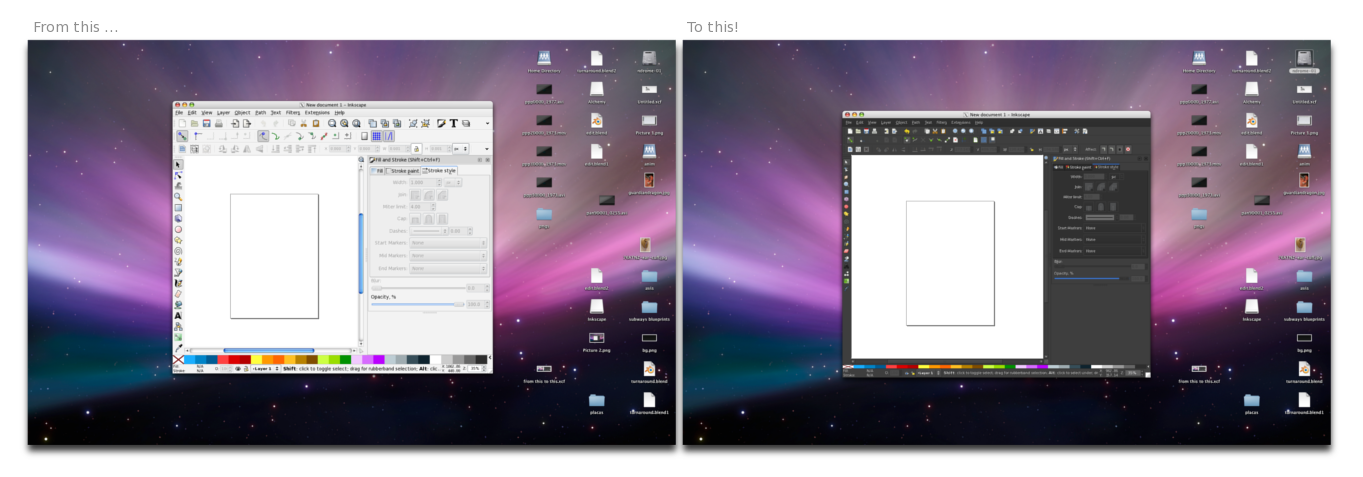
The main issue with Inkscape is the ugly theme that came by default. There’s no too much tweaks needed for Inkscape but at least we can get almost the same look and feel of gimp — a dark and tiny theme which is Very Fine and don’t make you feel uncomfortable to use it on OSX. As in the Gimp post, all these things also work in Linux and Windows so maybe you should give a try to these kind of hacks! 🙂

Ugly, big and too light gtk theme:

Well, as I said recently, you cannot install a theme in Inkscape, But if you do the following you can get a nice and dark theme! 🙂 Get this file -> Clearlooks-Quicksilver-OSX and unzip it, into a new folder called themes, into the Inkscape App folder:

OSX: /Applications/inkscape.App/Contents/Resources/themes/

“Making a DCP entirely with open source tools”

At the Bit Films blog, our compadre Chris Perry has posted multi-stage details of his cool project to create a Digital Cinema Package for The Incident at Tower 37. DCP is the digital cinema distribution format, delivered via hard drives which plug directly into theater projectors. Realizing that “we’re really just talking about some fancy […]

At the Bit Films blog, our compadre Chris Perry has posted multi-stage details of his cool project to create a Digital Cinema Package for The Incident at Tower 37.

DCP is the digital cinema distribution format, delivered via hard drives which plug directly into theater projectors. Realizing that “we’re really just talking about some fancy conversions to a non-proprietary format,” rather than resorting to expensive commercial solutions, Chris set out to mine the resources free/libre software offers the independent filmmaker.

Bassam’s small contribution was to cry “FFmpeg!” when Chris wished, “If only there was a tool to automatically output PNGs from a QuickTime movie…”

Check out the climax and how-to, or head to the beginning for Making a DCP, Part 1.

Working with Blender, Gimp and Inkscape in OSX. Part I

Official web: http://www.gimp.org Unofficial buils for OSX: http://gimp.lisanet.de/Website/Download.html The main issue with Gimp is related with the gtk port which even when it’s very good, still has somethings in development that you have to solve manually. For Example: Ugly, big and too light gtk theme: How to solve it? Get this file -> ProApp_Small.tar and […]

Official web: http://www.gimp.org
Unofficial buils for OSX:
http://gimp.lisanet.de/Website/Download.html

The main issue with Gimp is related with the gtk port which even when it’s very good, still has somethings in development that you have to solve manually. For Example:

Ugly, big and too light gtk theme:

How to solve it? Get this file -> ProApp_Small.tar and unzip it into your personal gimp folder:

OSX: /Users/……/Library/Application Support/Gimp/Themes/
UNIX: /home/……/.gimp-2.x/themes/
WIN: C:\Documents and Settings\……\.gimp-2.x\themes\

This theme came as default in the Gimp Build for OSX, but it has been modified by me to get tiny icons, less space between the elements, less padding, less margin and more tweaks.

If you want to install the theme for all the users just unzip the file into:

OSX: /Applications/Gimp.App/Contents/Resources/share/gimp/2.0/themes/
UNIX: /usr/share/gimp/2.x/themes
/
WIN: C:\Program Files\gimp-2.x\bin\share\gimp\2.0\themes\

©URCHIN 2015