

Mouth Rig Test

Welcome riggers! Before going on to the final character rig, I found it prudent to do a few small tests. I’m planning on doing a layered approach to the face rig, with some basic deformer based (armature/latice/curve/meshdeform/etc) controls for major motions on the ‘bottom’ layer, and more specific facial expressions on top. The latter will […]

Welcome riggers!

Before going on to the final character rig, I found it prudent to do a few small tests. I’m planning on doing a layered approach to the face rig, with some basic deformer based (armature/latice/curve/meshdeform/etc) controls for major motions on the ‘bottom’ layer, and more specific facial expressions on top. The latter will probably be blend shapes, but I haven’t decided completely yet.

For the jaw, I wanted the ability to rotate the jaw freely (as well as push it back and forth) where rotating down results in opening the mouth/lips, and rotating up results in squashing the lips/face, no interpenetration. I mulled a few ideas, but finally decided on combining an armature deform (this could get a replacement in the final rig) to open the jaw, and a lattice deform to squash it, blending between the two based on the jaw angle.

The final result is a bit more complicated than that; I couldn’t find an easy way to blend modifier influences, so I settled for having both modifiers always on, but blending the influence of the bones that do the deformation based on the angle of the jaw. There is a slight risk here: two non-multimodifiers in the stack on top of each other might look bad splitting the deform, but the result in this test wasn’t too bad.

I present you with a quick video capture of the result:

Download link

Keep in mind this is just a test! for a real rig, a lot of refinement would be needed to create pleasing deformations; more complex rigging than just the jaw and head for deformation, more constraints, better weight painting, more careful placement and design for the bulge lattice, correction shapes, etc. However, for a test, this is showing some promise- though I would be more comfortable if I could use multimodifiers and blend the influence of the modifiers directly.

I’ll post more tests as I go along. If anyone is remotely interested in the .blend file for such a simple thing, let me know, I’ll be happy to upload it.

Last note: If you are on a mac and cannot view the video, download XiphQT. If you are using Windows download the Ogg codecs for windows . Firefox, Opera and chrome users should be able to view the video directly in the browser (as should Safari users with XiphQT installed). If it doesn’t work, just use the download link instead.

Talk @ Hampshire GLUG

On Thursday, March 25th at 5:30 we’ll give a presentation at the Hampshire GLUG (GNU Linux User Group) in the East Lecture Hall on campus. We’ll screen the teaser and Elephants Dream, talk about Open Movie projects, about the CG Incubator Space and Tube. I plan on showing images and video from the production (including […]

On Thursday, March 25th at 5:30 we’ll give a presentation at the Hampshire GLUG (GNU Linux User Group) in the East Lecture Hall on campus. We’ll screen the teaser and Elephants Dream, talk about Open Movie projects, about the CG Incubator Space and Tube. I plan on showing images and video from the production (including sikrit unreleased stuff!!!! )

Being me, I’ll probably end up spending some or most of the time showing some Blender 2.5 goodies, especially where they affect our production- so those interested in using Blender for their own work, or users of older versions who haven’t made the switch and want a first time look might enjoy.

If you live close by, please come, the event is open to all (not just members of the glug) and we even have free food, provided by Fresh Side Cafe in Amherst.

Libre Planet!

So, we’re going to the Libre Planet meeting this weekend in Boston  (we being Bassam, Fateh, Pablo and Jarred.) Mainly we’ll be attending talks, working on Tube at the hackfest, helping out with the event, meeting people, catching up with friends at the event and in town, etc. We’ll see at least one regular of […]

So, we’re going to the Libre Planet meeting this weekend in Boston  (we being Bassam, Fateh, Pablo and Jarred.) Mainly we’ll be attending talks, working on Tube at the hackfest, helping out with the event, meeting people, catching up with friends at the event and in town, etc. We’ll see at least one regular of our irc channel in person for the first time (hey chris!) If you’re reading this, and going to the event, come say hi 🙂

What we’ll likely be working on: Rigging and scripting rigs in Blender 2.5, Concepts in Gimp, Animatic in Gimp and Blender.

Oh and this is Pablo and Jarred’s first visit to Boston/Cambridge. Any tips? Things we shouldn’t miss?

Cycling to the studio

Today was the first day of the season that we cycled into the studio. It’s magnificent taking the bike path during Spring and Summer, as the area is covered in forests and farmlands, and is a very inspiring way to start the day. Well energized, we’re back at boarding for myself and Pablo, while Bassam […]

Today was the first day of the season that we cycled into the studio. It’s magnificent taking the bike path during Spring and Summer, as the area is covered in forests and farmlands, and is a very inspiring way to start the day. Well energized, we’re back at boarding for myself and Pablo, while Bassam continues with the animatic and Fateh works on the script and schedule. We leave you with some photos of the cycling route during the Summer.

Post URL
3 comments

Working with Blender, Gimp and Inkscape in OSX. Part II

Official website: http://www.inkscape.org The main issue with Inkscape is the ugly theme that came by default. There’s no too much tweaks needed for Inkscape but at least we can get almost the same look and feel of gimp — a dark and tiny theme which is Very Fine and don’t make you feel uncomfortable to […]

Official website: http://www.inkscape.org

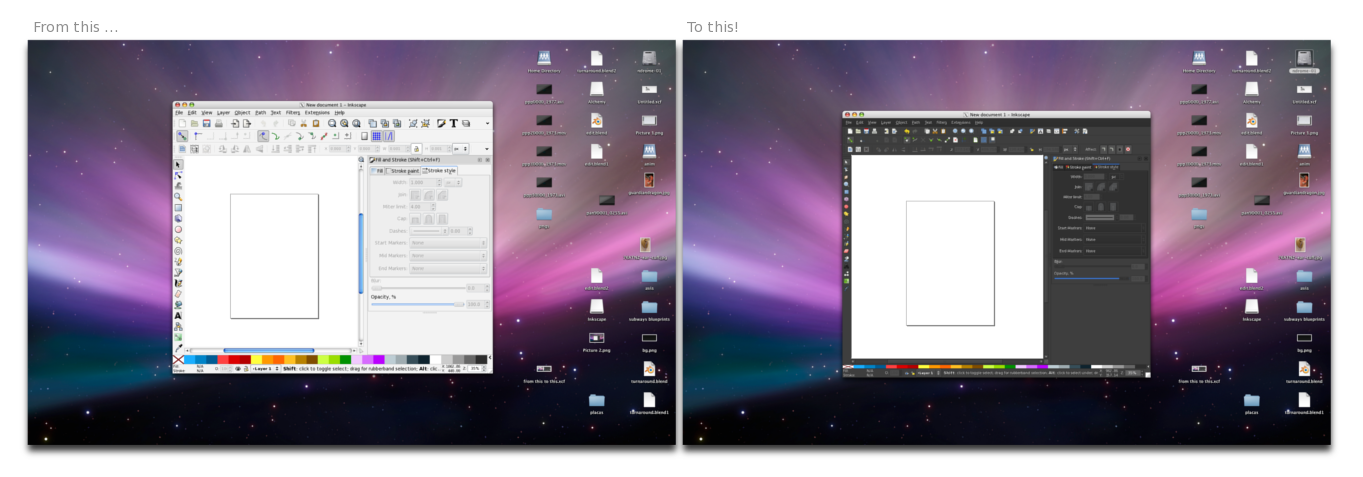
The main issue with Inkscape is the ugly theme that came by default. There’s no too much tweaks needed for Inkscape but at least we can get almost the same look and feel of gimp — a dark and tiny theme which is Very Fine and don’t make you feel uncomfortable to use it on OSX. As in the Gimp post, all these things also work in Linux and Windows so maybe you should give a try to these kind of hacks! 🙂

Ugly, big and too light gtk theme:

Well, as I said recently, you cannot install a theme in Inkscape, But if you do the following you can get a nice and dark theme! 🙂 Get this file -> Clearlooks-Quicksilver-OSX and unzip it, into a new folder called themes, into the Inkscape App folder:

OSX: /Applications/inkscape.App/Contents/Resources/themes/

©URCHIN 2015