tube weekly images and mini report

Our main production server just went down (It’ll be fixed soon) so I thought ‘good excuse to post on the blog’. We’ll be working through the downtime – this mainly hurts our ability to exchange files, most of us are working off local files anyway- but it will be a relief when things are back […]

Our main production server just went down (It’ll be fixed soon) so I thought ‘good excuse to post on the blog’. We’ll be working through the downtime – this mainly hurts our ability to exchange files, most of us are working off local files anyway- but it will be a relief when things are back to normal.

Current tasks are animation, texturing, lighting. We’ve got some awesome new team and I’m looking forward to the days to come. As we’ve been doing online weeklies, each one has had a banner image – just a random image from the project folder or whatever I happened to be working on at the time. I thought I’d upload some here:

[imagebrowser id=40]

Fall Tube Internships (likely the final term!)

Calling all students (18+), recent graduates, and professionals wanting to ply their 3D skills in libre software: Join Bassam and the URCHN crew this autumn on the Tube Open Movie production, hosted by the Bit Films animation incubator at Hampshire College, Massachusetts. Helmed by Chris Perry, formerly of Pixar and Rhythm & Hues, the program […]

Calling all students (18+), recent graduates, and professionals wanting to ply their 3D skills in libre software:

Join Bassam and the URCHN crew this autumn on the Tube Open Movie production, hosted by the Bit Films animation incubator at Hampshire College, Massachusetts. Helmed by Chris Perry, formerly of Pixar and Rhythm & Hues, the program draws together a lot of talent, so although the internships are unpaid, it promises to be a very stimulating and fruitful space. These positions offer an opportunity to improve your skills, develop your reel, and make useful contacts in the industry.

The official internship period runs from Monday September 24, 2012 through Friday December 14, 2012.. Applications are due (via email) no later than Friday September 14, at 5pm (EDT). We understand that this may be short lead time for those needing to make visa and travel arrangements. Because the project is ongoing, the internship period is flexible; if in doubt, apply!

Please read carefully the open positions announcement and FAQ! Have more questions? Email us: internships@bitfilms.com

Gnome Subtitle Editor for reviews!

As we are steadily pushing through to finish animation, Thomas has been creating rough mockups of the sound design, so we can iterate early and come to some conclusions before the final minute. Each time, we discuss some things about the sound, how to improve it, etc. This time, I was getting annoyed going back […]

As we are steadily pushing through to finish animation, Thomas has been creating rough mockups of the sound design, so we can iterate early and come to some conclusions before the final minute. Each time, we discuss some things about the sound, how to improve it, etc.

This time, I was getting annoyed going back and forth between a text editor and blender- clicking on one and then the other (focus follows mouse would be much, much better here!) and different hotkeys etc. Plus, text in a text editor requires me to estimate the frame/time of the note each time.

Then I had a little brainwave and downloaded gnome subtitle editor, and writing my comments as subtitles. It goes much smoother now and is a nice tip for teams who need to give feedback on videos. It’s also possible to use blender, but there the workflow would be a bit more tedious with markers (though grease pencil in the sequencer- if grease pencil could be used to display text as well as drawing, and could be rendered would be even better for me)

so here’s a little screenie in action. I paused it at a familiar shot so I wouldn’t show spoilers…

there’s actually many choices here – you can use video editors or blender (but then you have to render) or any number of subtitle editors. I just thought it was a neat use of something for the (wrong?) purpose.

SoftIK revisited

I’ve done some prior experiments in Soft IK, but shied away for it in gilgamesh because the rig was getting too complex for it’s own good, and because I couldn’t find a satisfactory way of solving it in blender 2.5 and above (my 2.4 solution depended on py constraints). Since we have great drivers in […]

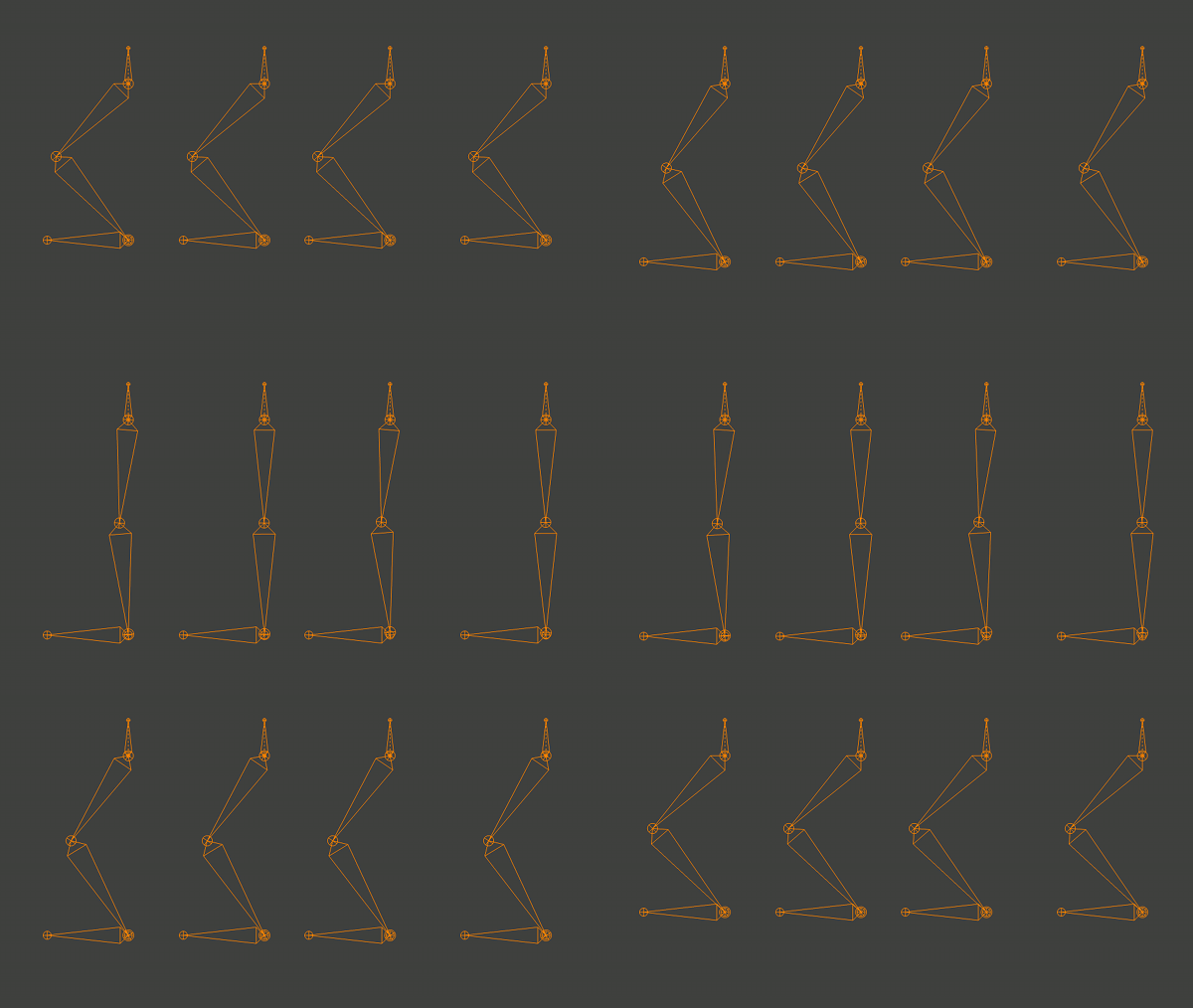
I’ve done some prior experiments in Soft IK, but shied away for it in gilgamesh because the rig was getting too complex for it’s own good, and because I couldn’t find a satisfactory way of solving it in blender 2.5 and above (my 2.4 solution depended on py constraints). Since we have great drivers in 2.5/6 series, I thought I’d try it that way. The result is below:

I’m guessing only seasoned animators will see the difference. From left to right we have:

  1. normal, non stretchy IK
  2. soft, non stretchy IK
  3. normal, stretchy IK
  4. soft, stretchy IK

Ik softness basically takes  care of the ‘pop’ at the knee so common in IK when going from straight to bent (or vice versa). This works out because the speed of that joint non-linearly increases as we are close to straight. Good sources here and here (softimage blog). My solution for non stretchy is exactly the same as that blog post- plugging the equation into a driver. For the stretchy case it was a bit trickier and they diverge, but the mathematical result is the same.

I’m not publishing the .blend yet, nor can I use this as is in gilga because the solution depends on driving a bone within a bone inside the same armature; until I find a workaround or blender will successfully handle this case in the dependency graph, this solution causes lagging and errors (there are python frame update handlers here double calculating the rigs to make them behave)

Once I get this working I’ll publish a simple .blend.

pipeline changes

  This is a slightly technical detail kind of post- the kind of geekery you’d be interested in if you’ve heard of revision control systems, GIT, Subversion, etc. It doesn’t seem to have to do a whole lot with 3D graphics, but managing files is always going to be an issue in a project of […]


This is a slightly technical detail kind of post- the kind of geekery you’d be interested in if you’ve heard of revision control systems, GIT, Subversion, etc. It doesn’t seem to have to do a whole lot with 3D graphics, but managing files is always going to be an issue in a project of any size.

Since the tube kickstarter campaign ended our team has swelled to 25, and most of them are not located at Hampshire. (Iincidentally why I haven’t blogged for so long- keeping the project running with an expanded team was a greater than full time job) Even a while ago, it was clear that SVN (aka subversion) was not a great fit for most people, for a bunch of reasons:

  1. You have to download the entire project (roughly 8 Gigabytes!) the first time you use it. Slow internet connections and bandwidth caps make this impractical for some.
  2. Not everybody is ‘technical’ – updating and committing is several, potentially error-prone steps, sometimes involving the dreaded command line 🙂
  3. GUI front ends are platform specific – different docs for different people.

Animators previously used what we called ‘production packages’ : we used blenderaid to pull out dependencies and make a zipped bundle of all the file the animator needed, this was:

  1. impractical to do updates on rigs/etc. while an animator was working
  2. hardcoded to anim files (though I could have fixed this)
  3. needed to ask the animator to send back work in progress for lighting tests.

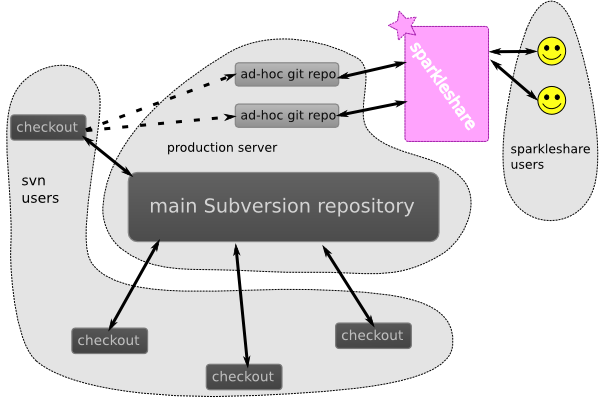
So we found sparkleshare ! Sparkleshare can be best thought of as a dropbox clone with a git backend. A while ago I looked at it, but it only had a linux client; now that it gained windows and mac clients, we migrated from the production package way to sparkleshare, and away from blenderaid to the blender python api. Now we have the following advantages:

  1. one click (on my end) to create a package for *any file* in the production tree – with a choice of including or excluding image files, and the possibility of adding more files easily to the same package.
  2. user on the end has to click twice, and enter two bits of information.
  3. end user experience after that resembles dropbox. updating rigs means just dropping them into the share, and we can get wip files at any time without having to ask.

Is it perfect? we found some issues (where else) on Windows, where there was no SSH client available (luckily one of our interns- Arindam Mondal) figured out how to use Putty and wrote an extensive Howto , and we also found that Windows XP is not supported. I’m frankly stunned that anyone is still using XP though 😉


 

©URCHIN 2015